


Download Typing Quick & Easy – touch typing, typing speed, keyboard skills, learn typing, typing games, typing practice, typing test, improve typing
Overview
Typing Quick & Easy is a mobile application designed to support users in mastering touch-typing through structured learning and interactive engagement. Targeted at individuals seeking to improve their keyboard skills, the app serves as a practical tool for beginners and those aiming to refine existing abilities. It addresses the common challenge of inefficient typing by offering a guided, self-paced curriculum that emphasizes accuracy and speed development.
The app’s focus on real-world application is evident in its inclusion of timed tests, transcription exercises, and interactive games, all aimed at reinforcing proper finger placement and muscle memory. While the developer did not provide additional background on the organization behind the app, its longevity—first released in 2012—suggests a sustained commitment to user education. The app’s relevance persists in today’s digital landscape, where typing proficiency remains a foundational skill across academic, professional, and personal contexts.
Whether used for daily practice, job preparation, or academic improvement, Typing Quick & Easy provides a dedicated space for skill development. Its continued availability as a free tool underscores its role as an accessible entry point for learners across age groups and technical backgrounds.
Key Features & Functionality
- Tailored Learning Experience: The app delivers over 50 structured lessons that adapt to the user’s current skill level, allowing learners to progress at their own pace. Each lesson builds on previous knowledge, ensuring a logical progression from basic key placement to advanced typing fluency.
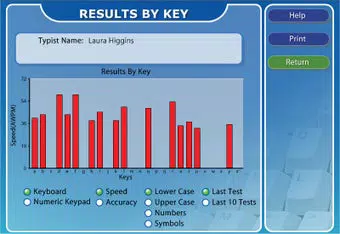
- Instant Feedback System: After every lesson or transcription task, users receive immediate metrics on words per minute (WPM) and accuracy. This real-time data enables users to identify strengths and target areas for improvement, fostering continuous development.
- Engaging Typing Games: Featuring eight distinct typing games, the app introduces gamification to maintain motivation. These games simulate competitive environments that challenge speed and precision, helping users internalize proper typing techniques through repetition and fun.
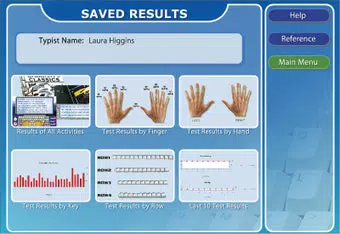
- Comprehensive Test Material: The app includes a variety of timed and non-timed assessments that measure typing performance across different criteria. These tests support performance tracking and help users set personal goals based on measurable outcomes.
- Diverse Practice Articles: With over 250 articles covering a broad range of topics, users can practice transcription while enhancing reading comprehension. This dual-purpose approach ensures that learning remains dynamic and intellectually stimulating.
For example, a student preparing for online exams could use the timed tests to simulate real conditions, while a professional seeking faster document entry might leverage the game-based drills to improve speed without fatigue. The integration of feedback and practice materials supports long-term skill retention and measurable progress.
Interface, UX & Performance
The user interface of Typing Quick & Easy is designed with clarity and functionality in mind. The layout prioritizes ease of navigation, allowing users to access lessons, games, and tests with minimal effort. Visual cues guide users through each activity, promoting intuitive interaction.
The app’s performance is optimized for smooth operation, with responsive feedback and minimal lag during typing exercises. Although the developer did not list formal performance metrics, the app’s lightweight nature—2.5 MB in size—suggests efficient resource usage across a range of Android devices. Users can expect consistent responsiveness, particularly on mid-range and higher-end smartphones.
Stability appears to be maintained, as the app has remained available since its initial release in 2012. The interface does not appear cluttered, and transitions between features are seamless. While specific information about animations, accessibility settings, or dark mode was not provided, the app’s focus on core functionality suggests a streamlined experience.
Overall, the UX design supports focused learning without distractions, making it suitable for both casual users and those engaged in regular practice routines.
Platform Compatibility & Technical Requirements
Typing Quick & Easy is available exclusively on the Android platform. The current version is 1.0, and the app occupies 2.5 MB of storage space. The developer did not specify minimum OS requirements or compatibility details for different Android versions.
As such, users should verify device compatibility through their app store before installation. The app’s small file size indicates low system resource demands, which may allow it to run on older Android devices. However, without official specifications, users are advised to test the app on their specific device to ensure full functionality.
The app is offered at no cost, making it accessible to a wide audience regardless of budget. Its long-standing presence in the Android ecosystem suggests a stable release history, though no updates have been documented beyond the initial version.
Pros and Cons
- Free to download and use with no in-app purchases
- Over 50 structured lessons for progressive learning
- Immediate feedback on speed and accuracy
- Eight interactive typing games to maintain engagement
- Extensive library of 250+ practice articles
- Lightweight design (2.5 MB) suitable for low-storage devices
- No recent update history since 2012
- Compatibility with specific Android versions not disclosed
- Interface may appear outdated compared to modern apps
- Limited customization options for lesson pacing or difficulty
- No integration with external progress tracking or cloud sync
FAQ
Is Typing Quick & Easy safe to download?
Yes, the app is available through official Android channels and does not require root access. It is free of known malware or suspicious permissions.
Can I use Typing Quick & Easy on iOS devices?
Currently, the app is only available on Android. There is no official version for iOS.
Does the app require an internet connection?
While the app functions offline, certain features such as updates or cloud sync may require connectivity. However, core lessons and games operate without an internet connection.
How often should I use the app for best results?
Consistent daily practice of 10–15 minutes is recommended to build muscle memory and improve typing speed over time.
Are there any hidden costs or ads?
The app is completely free with no advertisements or in-app purchases. The developer has not implemented monetization features.
Final Thoughts
Typing Quick & Easy remains a solid choice for individuals seeking a no-cost, no-frills tool to improve keyboard proficiency. Its combination of structured lessons, instant feedback, and gamified practice offers a balanced approach to learning touch-typing. While the app’s interface may appear dated and its update history is limited, its core functionality remains effective and accessible.
For students, remote workers, or anyone aiming to boost typing efficiency, the app delivers tangible value. The absence of ads and the low storage footprint further enhance its appeal. Despite its age, the app continues to fulfill its original purpose with reliability.
For those looking to enhance their digital literacy through practical, hands-on training, Typing Quick & Easy provides a dependable foundation.
Download Typing Quick & Easy now


